
Hi, CLI lovers.
I’ve been maintaining a reinstall script for a while now. It allows me to setup effortlessly a new Mac.
Until recently, I only had trouble when installing pCloud. Why? Because, as stated in this issue, its download URL is volatile. Why again? Because pCloud client is delivered by…pCloud itself.
To retrieve the latest version of pCloud client, we must use pCloud’s API. So, without further ado, let’s dive in.
Retrieving the API code
To retrieve a publicly shared file from pCloud’s API, you must be in possession of its code. Luckily for us, this code is quite easy to retrieve. Head to pCloud download page and, when the download begins, cancel it.
Now open the page source and scroll it a bit. You should find these lines near the top:
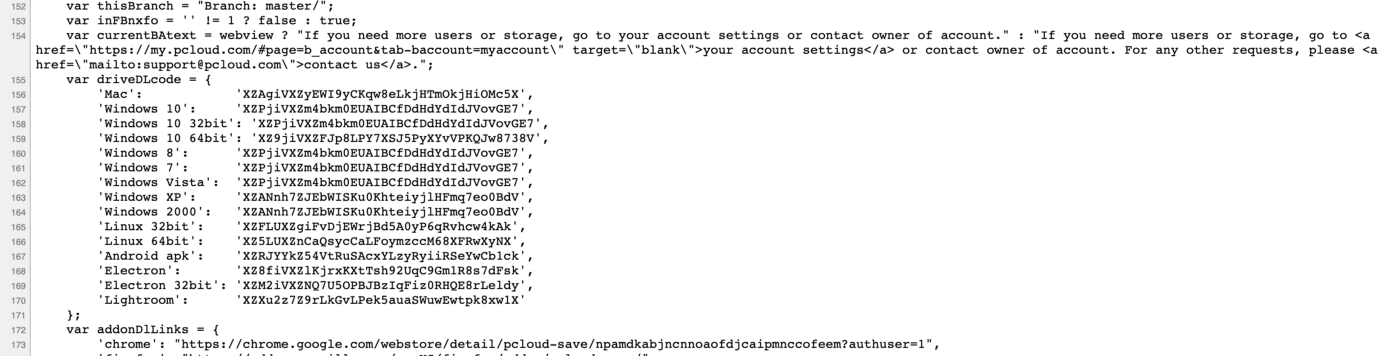
There we have all the API codes we need. Our script thus need to retrieve this page, search and isolate the API code. We can do it using shell script:
1
apicode=$(curl -s https://www.pcloud.com/how-to-install-pcloud-drive-mac-os.html\?download\=mac | grep "'Mac':" | sed "s/[ ,:']*//g;s/Mac//g" | tr -d '\t')
curl retrieves the page’s source, grep isolates the line containing ‘Mac’:, the we sed/tr out the unnecessary parts.
Then, we have to call pCloud’s API to get the download URL.
Calling pCloud’s API
Calling pCloud’s API is not difficult. Just use the correct URL and pass the code we just got:
1
url="https://api.pcloud.com/getpublinkdownload?code=${apicode}"
This API call will return a JSON array:
1
2
3
4
5
6
7
8
9
10
{
   "result":0,
   "expires":"Mon, 14 Sep 2020 23:26:47 +0000",
   "dwltag":"CgbnCGd7SbJyIMLamlsatV",
   "path":"\/cBZTQulgBZPr7SisZZZ3OgM37Z2ZZRw0ZkZvdbe7Z9FZM5ZWHZ9VZbVZ6FZ2FZVHZf7Zc7Zl7Z8XZu0ZrFZAgiVXZOr8pQSg6xa8qGE3QSr61Rj4XM9tX\/pCloud%20Drive%203.9.5.pkg",
   "hosts":[
      "p-par1.pcloud.com",
      "p-ams2.pcloud.com"
   ]
}
Ok, we need to isolate two things: the path, and one of the hosts.
Parsing JSON using shell
When I use this script, I want to rely only on my shell’s default tools. Nothing fancy like jq (a CLI JSON parser) or anything else.
So we will again sed/tr/grep our way out. It’s again quite simple though:
1
2
3
4
5
# get path from which we will download pcloud.
p=$(curl -s ${url} | grep path | sed 's/path//g;s/[" :,]*//g;s|\\||g' | tr -d '\t')

# get a host. There might be more than one, get the first one.
h=$(curl -s ${url} | grep .pcloud.com | head -1 | sed 's/[" ,]*//g' | tr -d '\t')
They respectively retrieve the path and the first host.
Now that we have everything we need, let’s download and install pCloud.
Downloading and installing
Now this is the easy part:
1
2
3
4
5
6
# retrieve pcloud
u="https://${h}${p}"
curl -s $u -o pcloud.pkg

#install pCloud
sudo -S installer -pkg pcloud.pkg -target /
There you go! Have fun!
Comments powered by Disqus.