
In a previous post, I talked about every kind of constructors modern C++ offers. I briefly introduces move constructors. Here I’m going to explain move semantics and why it’s so useful.
Comparing the Performance of Copying and Moving std::string Objects
C++11 introduced the std::move function, which allows objects to be moved instead of copied. Moving an object is more efficient than copying it because it involves simply transferring ownership of the object’s underlying resources, rather than creating a new copy of the object’s data. However, not all objects can be moved, and in some cases, it may still be more efficient to copy an object instead of moving it.
In this blog post, we will compare the performance of copying and moving std::string objects, which are a common type of object that can be moved in C++. We will use a simple benchmark to measure the time it takes to copy and move std::string objects of various sizes, and we will discuss the implications of the benchmark results.
Benchmark Setup
To compare the performance of copying and moving std::string objects, we will use the following benchmark setup:
- We will use the std::chrono library to measure the elapsed time of each operation.
- We will create a std::string object of a reasonable size.
- We will measure the time it takes to copy and move each std::string object N times.
Bench code
1
2
3
4
5
6
7
8
9
10
11
12
13
14
15
16
17
18
19
20
21
22
23
24
25
26
27
28
29
30
31
32
33
34
35
36
#include <string>
#include <chrono>
#include <iostream>

using namespace std::chrono;

constexpr int N = 100000;

int main()
{
    // measure the time it takes to copy the string N times
    auto start = high_resolution_clock::now();
    for (int i = 0; i < N; ++i)
    {
        std::string str = "this is a test string. Let's make it long so the compiler cannot optimize it.";
        std::string copy = str;
    }
    auto end = high_resolution_clock::now();
    auto copy_time = duration_cast<microseconds>(end - start);

    // measure the time it takes to move the string N times
    start = high_resolution_clock::now();
    for (int i = 0; i < N; ++i)
    {
        std::string str = "this is a test string. Let's make it long so the compiler cannot optimize it.";
        std::string moved = std::move(str);
    }
    end = high_resolution_clock::now();
    auto move_time = duration_cast<microseconds>(end - start);

    // print the results
    std::cout << "Copy time: " << copy_time.count() << " microseconds\n";
    std::cout << "Move time: " << move_time.count() << " microseconds\n";

    return 0;
}
Note: for each test I declare an instance of str. While this is clearly sub-optimal in a real-world context, there is a reason why in this particular one. Indeed, when str is moved to moved, its content is transfered. Creating str outside the loop would result in the string being moved on the first time, then only an empty shell for each next turn, making the results wrong.
Benchmark Results
After running the program a few times, I obtained the following result:
| Version | Average time (microseconds) |
|---|---|
| Copy | 801 |
| Move | 438 |
First conclusion
With this first example, we can see how our code benefits from move semantics: moving an object instead of copying if take way, way less time.
But wait, there is more…
std::string can contain way more than a few words.
Pushing std::string a bit further
About std::string’s capacity
The maximum capacity of a std::string object is determined by the amount of memory available on the system. This means that the maximum capacity of a std::string object can vary depending on the hardware and software environment in which the program is run.
In general, the maximum capacity of a std::string object is the largest value that can be represented by the size_type of the std::string class, which is an implementation-defined unsigned integer type. For example, on many systems, the size_type of std::string is an unsigned int, which means that the maximum capacity of a std::string object is the largest value that can be represented by an unsigned int, which is typically around 4 billion on a 32-bit system and around 18 billion on a 64-bit system.
However, even if the maximum capacity of a std::string object is very large, it is important to note that the actual amount of memory that can be allocated for a std::string object is limited by the amount of available memory on the system. This means that even if the maximum capacity of a std::string object is very large, it may not be possible to create a std::string object with that capacity if there is not enough memory available on the system.
In general, it is recommended to avoid creating very large std::string objects, as they can consume a significant amount of memory and may cause performance issues. Instead, it is often better to use other data structures, such as std::vector, which can dynamically resize their internal storage as needed without consuming excessive amounts of memory.
Testing move vs copy with increasingly large std::string
Let’s reuse the previous code, but this time with small to huge std::string instances:
1
2
3
4
5
6
7
8
9
10
11
12
13
14
15
16
17
18
19
20
21
22
23
24
25
26
27
28
29
30
31
32
33
34
35
36
37
38
39
40
41
42
43
44
45
46
47
48
49
#include <iostream>
#include <string>
#include <chrono>

const uint64_t STR_LENGTHS[] = {
    10,
    100,
    1000,
    10000,
    100000,
    1000000,
    10000000,
    100000000,
    1000000000};

void test_move_copy(std::string &str)
{
    // Measure the time it takes to copy the string
    auto start = std::chrono::high_resolution_clock::now();
    std::string copied_str = str;
    auto end = std::chrono::high_resolution_clock::now();
    auto elapsed_copy = std::chrono::duration_cast<std::chrono::microseconds>(end - start);

    // Measure the time it takes to move the string
    start = std::chrono::high_resolution_clock::now();
    std::string moved_str = std::move(str);
    end = std::chrono::high_resolution_clock::now();
    auto elapsed_move = std::chrono::duration_cast<std::chrono::microseconds>(end - start);

    // Output the results
    std::cout << "Copy time: " << elapsed_copy.count() << " microseconds" << std::endl;
    std::cout << "Move time: " << elapsed_move.count() << " microseconds" << std::endl;
}

int main()
{
    // Test move vs copy for strings of different lengths
    for (auto length : STR_LENGTHS)
    {
        std::cout << "String length: " << length << std::endl;

        std::string str(length, 'x');
        test_move_copy(str);

        std::cout << std::endl;
    }

    return 0;
}
Results
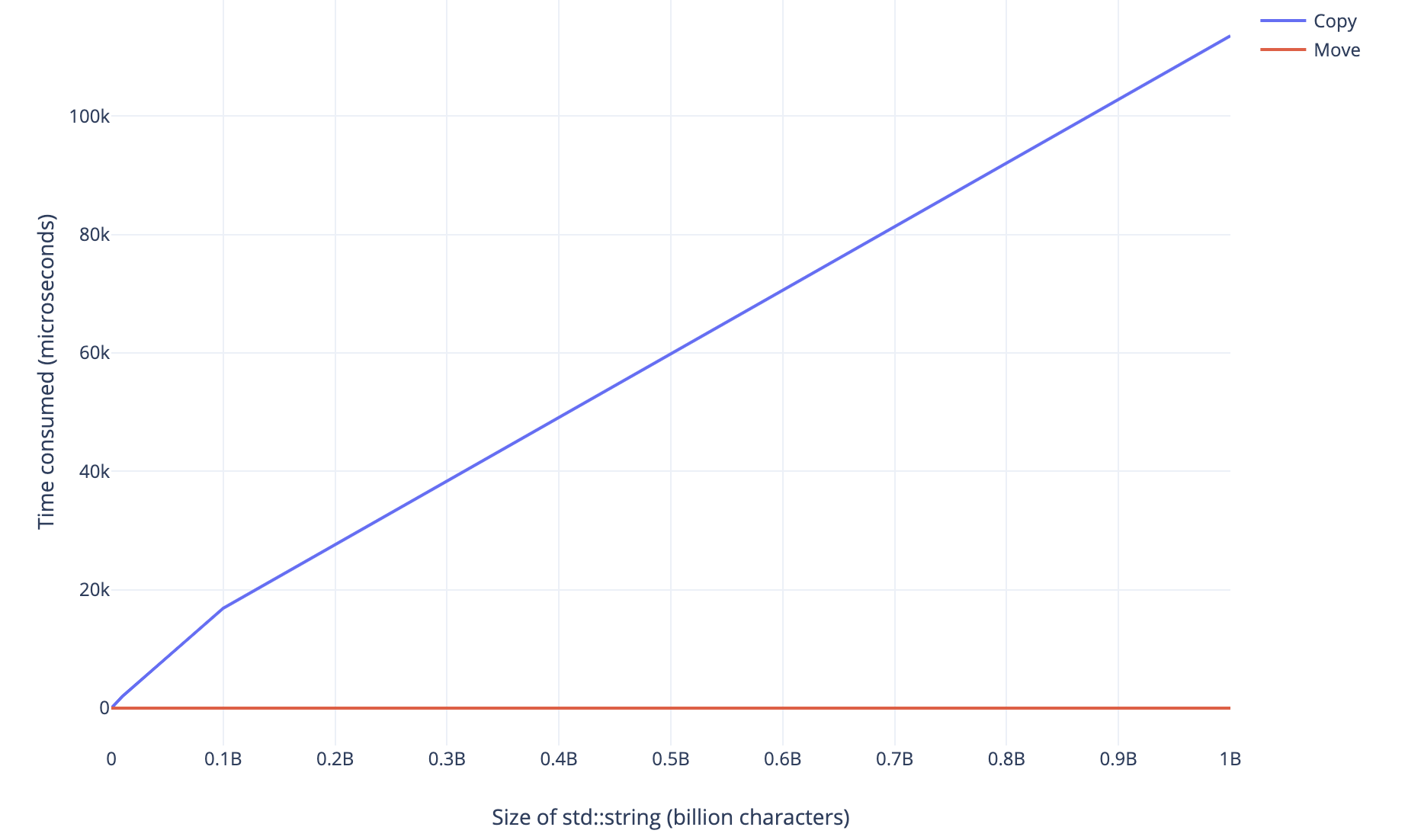
This chart clearly demonstrates the benefits of move semantics when using very large objects. Copying an instance of std::string takes a linear amount of time. Moving, however, takes a constant, almost negligible amount of time.
Comments powered by Disqus.